
How to Detect Pass-the-Ticket Attacks
Sep 28, 2022
In our first post of the series, we looked at ways to detect pass-the-hash attacks, which exploit NTLM authentication within an Active Directory domain. Pass-the-ticket is a related attack that which leverages Kerberos authentication to perform lateral movement.
In this post, we will dive into how the pass-the-ticket attack works and what you can do to detect it.
How Pass-the-Ticket Works
In a pass-the-ticket attack, an attacker extracts a Kerberos Ticket Granting Ticket (TGT) from LSASS memory on a system and then uses this valid ticket on another system to request Kerberos service tickets (TGS) to gain access to network resources.
One primary difference between pass-the-hash and pass-the-ticket is that Kerberos TGT tickets expire (10 hours by default), whereas NTLM hashes change only when the user changes their password. So a TGT ticket must be used within its lifetime, or it can be renewed for a longer period of time (7 days).
Mimikatz can be used to perform pass-the-ticket, but in this post, we wanted to show how to execute the attack using another tool, Rubeus, lets you perform Kerberos based attacks. Rubeus is a C# toolset written by harmj0y and is based on the Kekeo project by Benjamin Delpy, the author of Mimikatz.
Step 1. Extract the TGT.
To perform a pass-the-ticket attack with Rubeus, the first step is to obtain a TGT. TGTs and NTLM hashes may or may not be stored on a system after a user logs off, based on security settings. One of the fun/scary features of Rubeus is Monitor, which will look for 4624 logon events and dump the TGT data for any new logon sessions on a system.
If we use the following command, Rubeus will start monitoring for logon sessions every 30 seconds:
Rubeus.exe monitor /interval:30
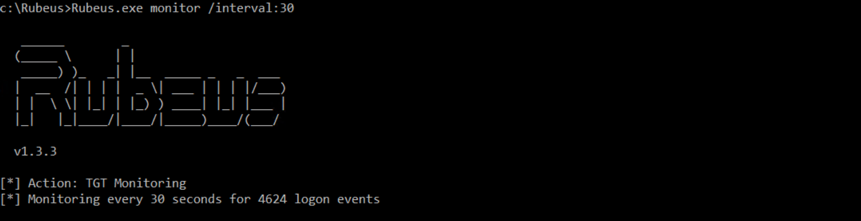
Now, if anybody logs onto this system, we will obtain their TGT. To simulate that, we will run a command as a user:
Runas /user:[domainusername] cmd.exe

Within 30 seconds, Rubeus will detect this logon and obtain the TGT for this user, and output it as a base64 encoded string:
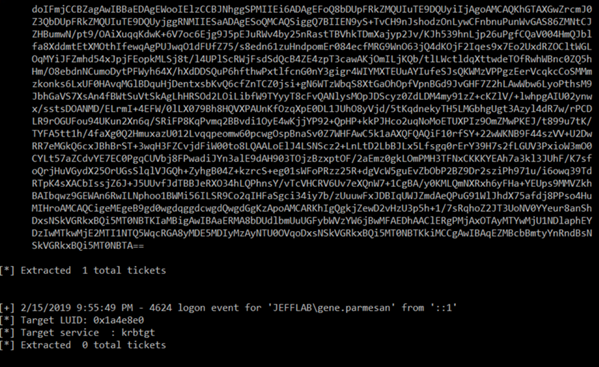
We can copy this string into a text editor and remove the line breaks and spaces.
Step 2. Pass the ticket.
Now that we have stolen the ticket, let’s use it before it expires. To do this, we will stick with Rubeus but this time use the ptt command:
Rubeus.exe ptt /ticket:[Base64 string goes here]
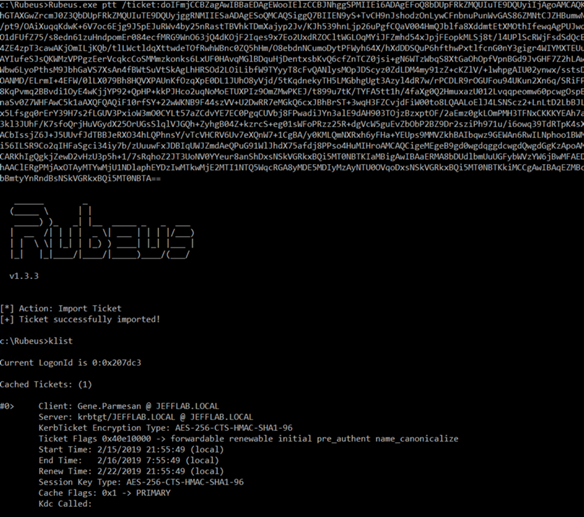
You can see we have a TGT for the compromised user loaded into session, and we can now use this to request TGS service tickets to access network resources as this user.
Detection
You can detect pass-the-ticket at the endpoint or on your domain controllers.
Detecting Pass-the-Ticket at the Endpoint
In researching detection of pass-the-ticket, we came across a very interesting approach posted by a researcher Eyal Neemany at Javelin Networks. It advises that when you want to investigate for pass-the-ticket activity, you can take the following steps for any endpoint in your environment:
- Look at the current logon sessions on that system.
- Use the klist command to inspect the Kerberos tickets associated with a session.
- Look for Kerberos tickets that do not match the user associated with the session, which would mean they were injected into memory and a pass-the-ticket attack is afoot.
Let’s take a deeper dive into these steps.
Step 1. To output all of the logon sessions, we can use this script adapted from the Get-LoggedOnUsers function on GitHub:
$regexa = '.+Domain="(.+)",Name="(.+)"
Step 2. Now we can use the klist –li command and pass in a session ID to see the tickets associated with that session.
Step 3. We inspected a session for the user Michael, but we see a Kerberos TGT for the user Gene. Pass-the-ticket detected!
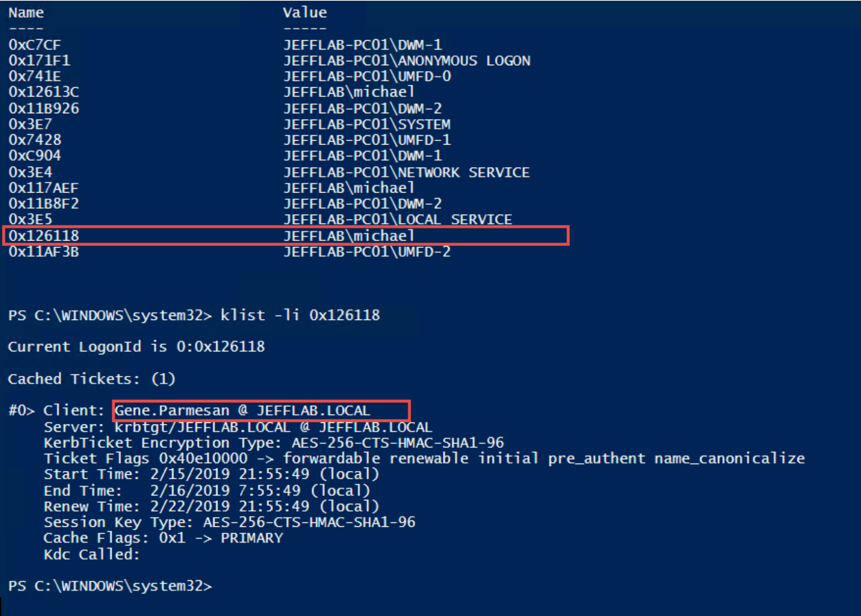
This worked reliably in test lab without false positives, but please leave a comment if you know of any ways that this can be triggered by activity other than pass-the-ticket.
Detecting Pass-the-Ticket on Domain Controllers
There is also a way to look for pass-the-ticket behavior on your domain controllers. It may not be quite as reliable, but it’s always good to have a detection you can get from your DC logs.
Event Logs for Legitimate Kerberos Authentication
To understand what to look for, let’s review the event logs we would see for normal Kerberos authentication on the network.
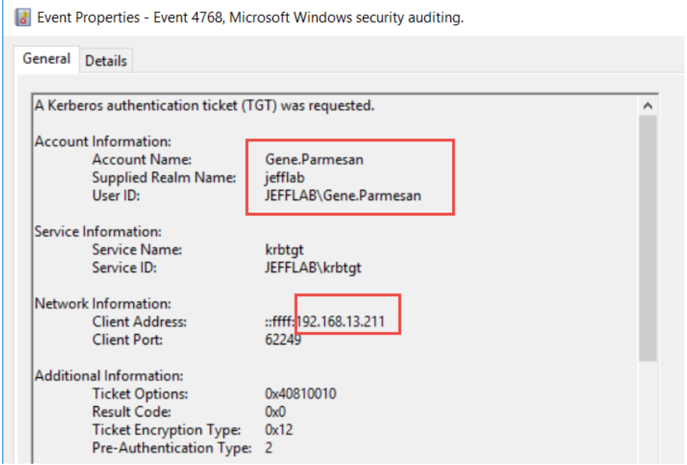
4768 – A Kerberos authentication ticket (TGT) was requested
The first event you should see is a 4768 event. This is the TGT request and is the first thing that must happen for a user to leverage Kerberos to access a network resource. You will get one of these for each user for every endpoint they access your domain from. If a user account logs in from two separate workstations, they will request a TGT from each.
The most relevant information in this event is the user who requested the TGT and the computer they requested it from:
4769 – A Kerberos service ticket was requested
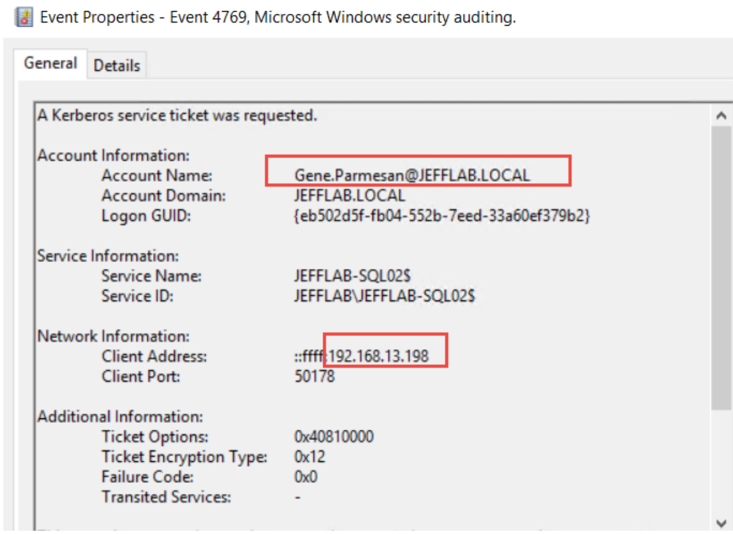
The next step in Kerberos authentication is for the user to use that TGT and request a TGS service ticket to access a service on a computer, such as CIFS to get to a file share. This will also show up in the logs in event 4769 and it will show the user who requested the ticket and the source computer:
4770 – A Kerberos service ticket was renewed
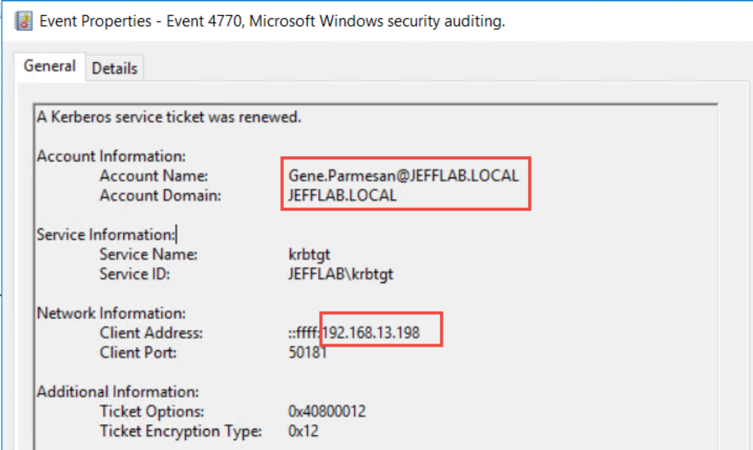
Renewing a TGT generates event 4770. By default, TGTs can be renewed for 7 days. If you want to test this, Rubeus has a command “renew” to renew TGTs that have been extracted. You can also see the user who renewed and the source of the renewal:
Prevent Pass-the-Ticket Attacks with Netwrix Threat Manager
Finding Events that Indicate Pass-the-Ticket Attacks
So what’s different in the event logs when there’s pass-the-ticket activity? What should look for? Well it’s likely that the attacker will harvest TGTs and then use them on a different system, so you can look for TGS requests or TGT renewals using a particular Account/Client pair that have no associated TGT request from that Account/Client pair. You would have to look at a TGS request or TGT renewal and then scan back the previous 10 hours to see if there was a TGT request that matches that user and computer. That is because in pass-the-ticket the attacker will never request a TGT; they will always steal it from LSASS. They may renew it, and they definitely may use it to request TGS service tickets.
Now, that detection goes above and beyond event log filtering, and doing it at scale likely requires a SIEM or third-party product. If you’re looking for a way to detect this, check out Netwrix Threat Manager and see how it can help with this and other Active Directory attacks, such as Golden Ticket, Pass the Hash and Kerberoasting.
$regexd = '.+LogonId="(d+)"
Step 2. Now we can use the klist –li command and pass in a session ID to see the tickets associated with that session.
Step 3. We inspected a session for the user Michael, but we see a Kerberos TGT for the user Gene. Pass-the-ticket detected!
This worked reliably in test lab without false positives, but please leave a comment if you know of any ways that this can be triggered by activity other than pass-the-ticket.
Detecting Pass-the-Ticket on Domain Controllers
There is also a way to look for pass-the-ticket behavior on your domain controllers. It may not be quite as reliable, but it’s always good to have a detection you can get from your DC logs.
Event Logs for Legitimate Kerberos Authentication
To understand what to look for, let’s review the event logs we would see for normal Kerberos authentication on the network.
4768 – A Kerberos authentication ticket (TGT) was requested
The first event you should see is a 4768 event. This is the TGT request and is the first thing that must happen for a user to leverage Kerberos to access a network resource. You will get one of these for each user for every endpoint they access your domain from. If a user account logs in from two separate workstations, they will request a TGT from each.
The most relevant information in this event is the user who requested the TGT and the computer they requested it from:
4769 – A Kerberos service ticket was requested
The next step in Kerberos authentication is for the user to use that TGT and request a TGS service ticket to access a service on a computer, such as CIFS to get to a file share. This will also show up in the logs in event 4769 and it will show the user who requested the ticket and the source computer:
4770 – A Kerberos service ticket was renewed
Renewing a TGT generates event 4770. By default, TGTs can be renewed for 7 days. If you want to test this, Rubeus has a command “renew” to renew TGTs that have been extracted. You can also see the user who renewed and the source of the renewal:
Finding Events that Indicate Pass-the-Ticket Attacks
So what’s different in the event logs when there’s pass-the-ticket activity? What should look for? Well it’s likely that the attacker will harvest TGTs and then use them on a different system, so you can look for TGS requests or TGT renewals using a particular Account/Client pair that have no associated TGT request from that Account/Client pair. You would have to look at a TGS request or TGT renewal and then scan back the previous 10 hours to see if there was a TGT request that matches that user and computer. That is because in pass-the-ticket the attacker will never request a TGT; they will always steal it from LSASS. They may renew it, and they definitely may use it to request TGS service tickets.
Now, that detection goes above and beyond event log filtering, and doing it at scale likely requires a SIEM or third-party product. If you’re looking for a way to detect this, check out Netwrix Threat Manager and see how it can help with this and other Active Directory attacks, such as Golden Ticket, Pass the Hash and Kerberoasting.
              $logon_users = @(Get-WmiObject win32_loggedonuser -ComputerName 'localhost')

        $session_user = @{}
        $logon_users |% {
            $_.antecedent -match $regexa > $nul
            $username = $matches[1] + "" + $matches[2]
            $_.dependent -match $regexd > $nul
            $session = $matches[1]
            $sessionHex = ('0x{0:X}' -f [int]$session)
            $session_user[$sessionHex] += $username

        }
        $session_user
Step 2. Now we can use the klist –li command and pass in a session ID to see the tickets associated with that session.
Step 3. We inspected a session for the user Michael, but we see a Kerberos TGT for the user Gene. Pass-the-ticket detected!
This worked reliably in test lab without false positives, but please leave a comment if you know of any ways that this can be triggered by activity other than pass-the-ticket.
Detecting Pass-the-Ticket on Domain Controllers
There is also a way to look for pass-the-ticket behavior on your domain controllers. It may not be quite as reliable, but it’s always good to have a detection you can get from your DC logs.
Event Logs for Legitimate Kerberos Authentication
To understand what to look for, let’s review the event logs we would see for normal Kerberos authentication on the network.
4768 – A Kerberos authentication ticket (TGT) was requested
The first event you should see is a 4768 event. This is the TGT request and is the first thing that must happen for a user to leverage Kerberos to access a network resource. You will get one of these for each user for every endpoint they access your domain from. If a user account logs in from two separate workstations, they will request a TGT from each.
The most relevant information in this event is the user who requested the TGT and the computer they requested it from:
4769 – A Kerberos service ticket was requested
The next step in Kerberos authentication is for the user to use that TGT and request a TGS service ticket to access a service on a computer, such as CIFS to get to a file share. This will also show up in the logs in event 4769 and it will show the user who requested the ticket and the source computer:
4770 – A Kerberos service ticket was renewed
Renewing a TGT generates event 4770. By default, TGTs can be renewed for 7 days. If you want to test this, Rubeus has a command “renew” to renew TGTs that have been extracted. You can also see the user who renewed and the source of the renewal:
Finding Events that Indicate Pass-the-Ticket Attacks
So what’s different in the event logs when there’s pass-the-ticket activity? What should look for? Well it’s likely that the attacker will harvest TGTs and then use them on a different system, so you can look for TGS requests or TGT renewals using a particular Account/Client pair that have no associated TGT request from that Account/Client pair. You would have to look at a TGS request or TGT renewal and then scan back the previous 10 hours to see if there was a TGT request that matches that user and computer. That is because in pass-the-ticket the attacker will never request a TGT; they will always steal it from LSASS. They may renew it, and they definitely may use it to request TGS service tickets.
Now, that detection goes above and beyond event log filtering, and doing it at scale likely requires a SIEM or third-party product. If you’re looking for a way to detect this, check out Netwrix Threat Manager and see how it can help with this and other Active Directory attacks, such as Golden Ticket, Pass the Hash and Kerberoasting.
Compartilhar em
Saiba Mais
Sobre o autor

Jeff Warren
Diretor de Produto
Jeff Warren supervisiona o portfólio de produtos da Netwrix, trazendo mais de uma década de experiência em gestão e desenvolvimento de produtos focados em segurança. Antes de se juntar à Netwrix, Jeff liderou a organização de produtos na Stealthbits Technologies, onde utilizou sua experiência como engenheiro de software para desenvolver soluções de segurança inovadoras em escala empresarial. Com uma abordagem prática e um talento para resolver desafios de segurança complexos, Jeff está focado em construir soluções práticas que funcionam. Ele possui um BS em Sistemas de Informação pela Universidade de Delaware.
Saiba mais sobre este assunto
Exemplo de Análise de Risco: Como Avaliar Riscos
O Triângulo da CIA e Sua Aplicação no Mundo Real
Criar usuários do AD em massa e enviar suas credenciais por e-mail usando PowerShell
Como adicionar e remover grupos AD e objetos nos grupos com PowerShell
Atributos do Active Directory: Último Logon