
How to Detect Password Changes in Active Directory
Native Auditing
- Run GPMC.msc (url2open.com/gpmc) → open "Default Domain Policy" → Computer Configuration → Policies → Windows Settings → Security Settings → Local Policies → Audit Policy:
- Audit account management → Define → Success and Failure.
- Run GPMC.msc → open "Default Domain Policy" → Computer Configuration → Policies → Windows Settings → Security Settings → Event Log → Define:
- Maximum security log size to 1GB
- Retention method for security log to Overwrite events as needed
- Open Event viewer and search Security log for event id’s: 628/4724 – password reset attempt by administrator and 627/4723 – password change attempt by user.
Netwrix Auditor for Active Directory
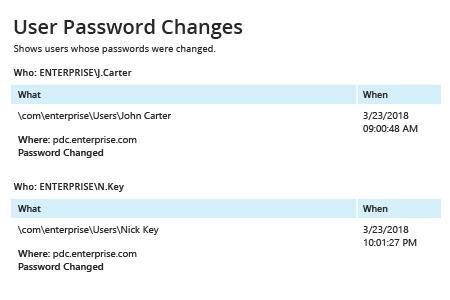
- Run Netwrix Auditor → Navigate to “Reports” → Open “Active Directory” → Go to “Active Directory Changes” → Select “Password Resets by Administrator” or “User Password Changes” → Click “View”.
- To get reports on email regularly, choose "Subscribe" option and define schedule and recipient.
Share on