
Abus des autorisations d'application Entra ID – Fonctionnement et stratégies de défense
L'abus des permissions d'applications Entra ID (anciennement Azure AD) est une technique d'attaque avancée où les adversaires exploitent des enregistrements d'applications mal configurés ou sur-privilégiés, des octrois de consentement et des identifiants délégués/statiques dans Microsoft Entra ID pour obtenir un accès non autorisé, escalader des privilèges, exfiltrer des données ou maintenir un accès persistant. L'objectif principal est d'abuser des permissions d'applications légitimes pour agir au nom des utilisateurs ou du locataire sans nécessiter le vol traditionnel de justificatifs d'identité.
Attribut | Détails |
|---|---|
|
Type d'attaque |
Abus de permission d'application Entra ID |
|
Niveau d'impact |
Élevé |
|
Target |
Locataires de cloud, consommateurs de SaaS, entreprises, gouvernements |
|
Vecteur d'attaque principal |
Enregistrements d'applications mal configurés, consentements excessifs, secrets/certificats d'applications compromis, flux OAuth |
|
Motivation |
Exfiltration de données, escalade latérale de cloud à on-prem, persistance, prise de contrôle de locataire |
|
Méthodes de prévention courantes |
Conception d'application selon le principe du moindre privilège, restrictions de consentement, authentification basée sur des certificats, accès conditionnel, audit continu du consentement/des permissions |
Facteur de risque | Niveau |
|---|---|
|
Dommages potentiels |
Très élevé |
|
Facilité d'exécution |
Moyen |
|
Probabilité |
Moyen à Élevé |
Qu'est-ce que l'abus de permission d'application Entra ID ?
L'abus de permissions d'application Entra ID se produit lorsque des attaquants exploitent des permissions au niveau de l'application (permissions d'application, permissions déléguées, étendues consenties par l'administrateur), une configuration incorrecte du consentement OAuth, des secrets de client ou des certificats divulgués, ou des principaux de service abusés pour effectuer des actions privilégiées dans un locataire. Contrairement aux compromissions basées sur des mots de passe, cette technique utilise des mécanismes légitimes de la plateforme (jetons OAuth, rôles d'application, appels API Graph) de sorte que les actions malveillantes apparaissent souvent comme une activité d'application normale.
Comment fonctionne l'abus de permission d'application ?
Ci-dessous, vous trouverez une décomposition étape par étape des techniques et des étapes typiques que les attaquants utilisent pour exploiter les permissions d'applications Entra ID.
1. Obtenir un premier point d'appui
Les attaquants obtiennent d'abord un point d'appui lié au locataire du cloud cible. Les points d'entrée courants incluent le phishing (pour obtenir le consentement délégué de l'utilisateur), les comptes d'utilisateurs compromis, les secrets de client d'application divulgués à partir de dépôts/configurations, la clé privée/certificat volé pour une application, ou l'exploitation de flux de travail de consentement d'administration faibles.
2. Découvrez les applications enregistrées et les permissions
Une fois à l'intérieur, les attaquants énumèrent les principaux services et les inscriptions d'applications pour identifier les applications disposant de permissions à privilèges élevés (par exemple, Application.ReadWrite.All, Directory.ReadWrite.All, Mail.ReadWrite, Group.ReadWrite.All). L'énumération peut être réalisée via des requêtes Microsoft Graph, l'accès au portail Azure AD, ou en utilisant des jetons délégués pour lister les applications d'entreprise et leurs portées accordées.
3. Identifier les chemins de consentement et de délégation exploitables
Les attaquants recherchent des applications qui ont reçu le consentement d'un administrateur, des applications avec des délégations de portée trop larges, des points de terminaison anciens qui autorisent l'octroi implicite, ou des informations d'identification de client confidentielles (secrets/certificats) mal protégées. Ils chassent spécifiquement les applications qui permettent un accès en arrière-plan (permissions d'application) qui ne nécessitent pas d'utilisateur connecté.
4. Exfiltrer/voler des identifiants d'application ou abuser du consentement
Si les secrets de clients ou les certificats sont découvrables (dans les pipelines, dépôts, fichiers de configuration ou Key Vault avec un accès faible), les attaquants les extraient et les échangent contre des jetons. Dans les flux de consentement délégué, les attaquants peuvent tromper les utilisateurs privilégiés en consentant à des portées d'applications malveillantes (hameçonnage de consentement). Ils peuvent également tirer parti des fonctionnalités d'octroi de consentement dans les applications multi-locataires.
5. Acquérir des jetons et effectuer des actions privilégiées
En utilisant des identifiants volés/abusés ou un consentement accordé, les attaquants demandent des jetons d'accès OAuth (jetons d'application pour les permissions d'applications ou jetons délégués au nom des utilisateurs) et appellent Microsoft Graph ou d'autres API pour lister les utilisateurs, lire les courriels, télécharger des fichiers OneDrive, modifier des objets d'annuaire ou créer des portes dérobées (nouvelles inscriptions d'applications ou rôles personnalisés).
6. Escalader, persister et se déplacer latéralement
Avec les autorisations d'application, les attaquants peuvent créer de nouveaux principaux de service, ajouter des identifiants, attribuer des rôles ou exfiltrer des données à grande échelle. Parce que les jetons d'application peuvent être valides pendant de longues périodes et que les opérations semblent souvent légitimes, les attaquants peuvent maintenir la persistance et passer des dépendances cloud aux dépendances sur site (par exemple, en synchronisant les informations d'identité, en modifiant les connecteurs hybrides).
✱ Variante : Hameçonnage de consentement & Applications multi-locataires frauduleuses
Trompez les utilisateurs privilégiés pour leur faire accorder des permissions étendues. Les attaquants hébergent des applications apparemment bénignes qui demandent des portées dangereuses et utilisent l'ingénierie sociale pour obtenir le consentement d'administrateurs ou d'utilisateurs privilégiés. Une fois le consentement obtenu, l'application peut agir à l'échelle du locataire. Des applications multi-locataires malveillantes peuvent être utilisées pour récolter le consentement d'administration de plusieurs locataires.
L'abus des flux OAuth hérités et des octrois implicites : Les anciens flux OAuth ou les URI de redirection mal configurés peuvent permettre le vol de jetons ou le contournement du consentement. Les attaquants exploitent ces failles pour obtenir des jetons délégués sans les protections de flux d'utilisateur interactif.
Diagramme de flux d'attaque
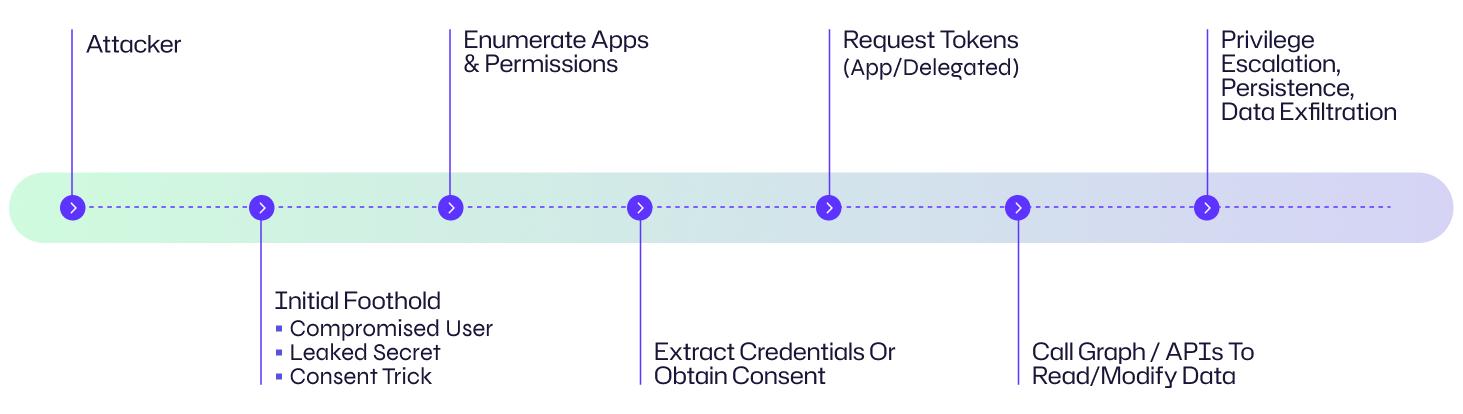
Exemple : Perspective de l'organisation
Voici à quoi cela ressemble du point de vue d'une organisation : Un attaquant utilise une technique de hameçonnage contre un administrateur chez Contoso Corp pour obtenir son consentement sur une application qui semble être un outil d'analyse légitime. Une fois l'application approuvée par l'administrateur, l'attaquant échange les identifiants de l'application contre des jetons d'application et utilise Microsoft Graph pour énumérer les boîtes aux lettres et télécharger des documents sensibles depuis OneDrive. Ils enregistrent ensuite un principal de service secondaire avec un certificat à longue durée de vie pour conserver l'accès, permettant ainsi une exfiltration prolongée et des modifications du locataire.
Exemples d'abus de permission d'application
Case | Impact |
|---|---|
|
Campagnes de hameçonnage de consentement OAuth |
Les attaquants ont utilisé le phishing de consentement pour obtenir des autorisations d'application à l'échelle du locataire, permettant un accès massif aux boîtes aux lettres et un vol de données dans plusieurs organisations. |
|
Fuites de secrets clients dans les dépôts publics |
Plusieurs incidents montrent des attaquants découvrant des secrets d'applications dans des dépôts Git publics ou des artefacts de déploiement, les utilisant pour créer des jetons et accéder à des ressources sans jamais toucher aux mots de passe des utilisateurs. |
Conséquences de l'abus de permissions d'application
L'abus des permissions d'application Entra ID peut entraîner des conséquences graves : compromission du locataire, exfiltration massive de données, création non autorisée de comptes et de principaux de service, mouvement latéral vers des ressources sur site et persistance de longue durée difficile à détecter.
Conséquences financières
Les attaquants peuvent exfiltrer la propriété intellectuelle, les informations personnelles des clients ou les données financières entraînant des fraudes, des amendes réglementaires, des demandes de rançon ou des coûts de remédiation (analyse judiciaire, juridique, notification). L'abus de ressources cloud (par exemple, le cryptominage) peut également entraîner des factures inattendues.
Perturbation opérationnelle
La manipulation d'objets d'annuaire, des appartenances à des groupes ou la synchronisation des identités peut perturber les flux d'authentification, provoquer des pannes dans des applications critiques ou forcer des rotations d'urgence et la reconfiguration des intégrations.
Dommages à la réputation
Les compromissions de locataires ou les fuites de données liées à des abus de permissions d'applications peuvent éroder la confiance des clients, attirer une presse négative et endommager les relations avec les partenaires.
Impact juridique et réglementaire
L'exposition non autorisée de données réglementées (PHI, dossiers financiers) peut déclencher des enquêtes de conformité GDPR, HIPAA ou autres, des amendes et d'éventuelles poursuites judiciaires.
Domaine d'impact | Description |
|---|---|
|
Financier |
Vol de données, fraude, abus de facturation cloud |
|
Opérationnel |
Flux d'authentification cassés, interruptions de service |
|
Réputationnelle |
Perte de confiance des clients, préjudice à la marque |
|
Juridique |
Pénalités réglementaires, procès |
Cibles courantes de l'abus de permission d'application : Qui est à risque ?
Applications d'entreprise sur-privilégiées
Les applications auxquelles on a accordé des permissions Directory.* ou des permissions d'application à l'échelle du locataire sont des cibles de grande valeur car elles permettent des opérations en masse sur les identités et les ressources.
Intégrations multi-locataires ou orientées client
Les applications SaaS tierces ou les applications multi-locataires qui demandent des étendues larges peuvent être abusées si un administrateur donne son consentement ou si l'application elle-même est malveillante.
Fuites dans les pipelines DevOps/CI
Les secrets de client ou les certificats accidentellement intégrés au contrôle de source, stockés dans un stockage non sécurisé ou accessibles depuis les journaux d'intégration continue rendent les clients confidentiels vulnérables.
Configurations OAuth héritées & lacunes de l'accès conditionnel
Les applications utilisant des flux d'authentification obsolètes ou les locataires sans politiques strictes d'Accès Conditionnel (par exemple, pas de MFA sur consentement, pas de workflows de consentement administratif) sont plus faciles à exploiter.
Principaux de service obsolètes ou non surveillés
Les anciennes inscriptions d'applications ou celles abandonnées possédant toujours des identifiants valides constituent des vecteurs d'attaque persistants que les attaquants peuvent forcer à leur guise.
Évaluation des risques
Facteur de risque | Niveau |
|---|---|
|
Dommages potentiels |
Très élevé — compromission à l'échelle du locataire et accès massif aux données possible. |
|
Facilité d'exécution |
Moyen — nécessite de la reconnaissance ainsi que de l'ingénierie sociale ou la découverte de justificatifs d'identité, mais les techniques et les outils sont largement connus. |
|
Probabilité |
Moyen à Élevé — de nombreux locataires ont encore des flux de travail d'approbation, des secrets divulgués ou des enregistrements d'applications permissifs. |
Comment prévenir l'abus de permission d'application
La prévention est à plusieurs niveaux : réduire le rayon d'impact, renforcer l'authentification des applications et minimiser les erreurs de consentement humain.
Hygiène des applications et des consentements
- Appliquez les étendues de privilèges minimales : Demandez uniquement les étendues Microsoft Graph nécessaires et préférez les autorisations déléguées plutôt que les autorisations d'application lorsque cela est possible.
- Utilisez des workflows de consentement administratif : Exigez des justifications et le consentement d'administrateurs multiples pour les applications à hauts privilèges.
- Restreignez qui peut enregistrer ou donner son consentement aux applications : Limitez l'enregistrement des applications et le consentement administratif à un petit groupe évalué.
- Examinez et supprimez les applications inutilisées : Auditez régulièrement les principaux services et les inscriptions d'applications pour supprimer ceux qui sont orphelins ou inutiles.
Protégez les identifiants et les secrets
- Préférez l'authentification basée sur des certificats (asymétrique) pour les clients confidentiels au lieu des secrets clients. Les certificats sont moins susceptibles d'être exposés et peuvent être renouvelés en toute sécurité.
- Stockez les secrets dans des coffres gérés (Azure Key Vault) avec un contrôle d'accès basé sur les rôles strict et un accès d'identité géré — jamais dans le code source ou les configurations en texte clair.
- Automatisez la rotation des secrets et des certificats clients et appliquez des durées de vie courtes lorsque cela est opérationnellement possible.
Contrôle d'accès conditionnel & de session
- Exigez un accès conditionnel pour l'émission de jetons d'application : Bloquez les connexions risquées, exigez des appareils conformes et appliquez l'authentification multifacteur pour les flux délégués lorsque cela est applicable.
- Utilisez l'évaluation continue de l'accès pour révoquer les jetons lorsque des signaux à risque apparaissent.
Conception et surveillance des applications
- Concevez des applications pour le moindre privilège et la transparence : Mettez en œuvre des fonctionnalités basées sur le consentement et des portées granulaires ; documentez pourquoi chaque permission est nécessaire.
- Enregistrez et surveillez l'utilisation de l'API Graph : Alertez sur les modèles inhabituels (téléchargements importants de boîtes aux lettres, énumération massive d'utilisateurs, création de nouvelles applications/principes de service).
- Restreignez les applications pouvant utiliser les autorisations d'application via la gestion des droits et la politique.
Comment Netwrix peut aider
Netwrix Identity Threat Detection & Response (ITDR) renforce votre défense contre l'abus des permissions des applications Entra ID en surveillant en continu les enregistrements d'applications à risque, les octrois de consentement anormaux et les activités suspectes de l'API Graph. En détectant tôt les escalades de privilèges non autorisées et en automatisant les actions de réponse telles que les alertes ou la révocation des permissions compromises, Netwrix ITDR vous aide à minimiser le temps de présence et à réduire le rayon d'impact des attaques axées sur l'identité. Avec une visibilité complète sur Active Directory hybride et Entra ID, les organisations peuvent appliquer le principe du moindre privilège, sécuriser les principaux de service à haut risque et enquêter rapidement sur les indicateurs de compromission - assurant une Data Security That Starts with Identity.
Stratégies de détection, d'atténuation et de réponse
Détection
- Surveillez les modèles inhabituels de l'API Graph : pics dans Applications.ReadWrite.All, Users.ReadAll ou téléchargements de gros fichiers.
- Alertez sur les nouvelles inscriptions d'applications et les nouveaux identifiants : notifiez lorsqu'un principal de service est créé, des identifiants sont ajoutés ou un consentement est accordé.
- Suivez les événements de consentement administratif et qui les a approuvés : signalez un consentement administratif inattendu provenant de lieux ou de moments inhabituels.
- Détectez l'émission de jetons anormaux : les jetons demandés par des clients inconnus ou utilisant d'anciens identifiants doivent être enquêtés.
- Utilisez la tromperie : créez des applications leurres ou des principaux de service et surveillez tout accès à ceux-ci.
Réponse
- Révoquez immédiatement les informations d'identification compromises : faites tourner les secrets des clients, révoquez les certificats et supprimez les informations d'identification divulguées de tous les emplacements.
- Supprimez le consentement des applications malveillantes et désactivez les principaux services offensants : retirez les permissions et désactivez l'application pour bloquer tout accès ultérieur à l'API.
- Forcez l'invalidation des jetons : invalidez les jetons d'actualisation et les jetons d'accès émis lorsque cela est possible et exigez une réauthentification.
- Réalisez un audit à l'échelle du locataire : examinez les rôles, les adhésions aux groupes, les permissions déléguées et les connecteurs de provisionnement pour les impacts secondaires.
- Chassez les artefacts latéraux : vérifiez les comptes créés, les attributions de rôles, les enregistrements d'applications anormaux ou les politiques d'accès conditionnel modifiées.
Atténuation
- Adoptez Zero Trust pour l'identité : vérifiez en continu chaque demande et limitez ce que toute application ou identité peut faire.
- Utilisez l'automatisation à moindre privilège : autorisez uniquement l'automatisation et les applications à accéder aux ressources nécessaires et isolez les tâches à haut risque dans des principes de service dédiés et audibles.
- Mettez en œuvre des contrôles rigoureux de la chaîne d'approvisionnement : analysez les dépôts, les pipelines CI et les artefacts de déploiement à la recherche de secrets divulgués et intégrez l'analyse des secrets dans les vérifications des PR.
Impact spécifique à l'industrie
Industrie | Impact |
|---|---|
|
Santé |
Un compromis peut exposer les informations de santé protégées (PHI) provenant des systèmes de dossiers médicaux électroniques dans le cloud ou des communications avec les patients (email/OneDrive), enfreignant ainsi le HIPAA. |
|
Finance |
Les attaquants peuvent accéder aux données de transaction, aux informations personnelles des clients ou aux systèmes de paiement intégrés via OAuth, entraînant des conséquences réglementaires et financières. |
|
Commerce de détail |
L'exposition des données des clients, des identifiants de programme de fidélité ou des intégrations de la chaîne d'approvisionnement peut entraîner des fraudes et des violations de conformité. |
Évolution des attaques et tendances futures
- Le phishing par consentement se perfectionne : l'ingénierie sociale combinée à des pages d'applications soignées augmente le succès du consentement administratif.
- L'automatisation de la reconnaissance des applications : les outils analysent désormais les locataires pour détecter les applications à haut risque, les identifiants divulgués et les secrets de devops à grande échelle.
- Les identifiants non interactifs à longue durée de vie restent attrayants — la protection et la rotation des certificats deviennent des défenses standard.
- Les ponts d'identité du cloud vers le local : les attaquants combinent de plus en plus l'abus d'Entra ID avec des connecteurs de synchronisation hybride pour étendre leur portée dans l'AD local.
- La reconnaissance assistée par IA : des systèmes automatisés analysent les métadonnées du locataire pour trouver le chemin le plus court vers des permissions à fort impact.
Statistiques clés & Infographies
(Métriques imaginées pour souligner — remplacez par votre télémétrie lorsque disponible.)
• Un grand pourcentage d'incidents implique des secrets divulgués ou mal gérés dans CI/CD.
• Les campagnes de phishing par consentement ont représenté une part notable des compromissions dans le cloud ces dernières années.
• De nombreuses organisations ne procèdent pas à des audits réguliers des autorisations d'applications et des principaux de service.
Réflexions finales
L'abus des permissions de l'application Entra ID est puissant car il utilise les capacités légitimes de la plateforme, ce qui fait que l'activité malveillante se confond avec l'automatisation normale. La posture de défense devrait combiner des contrôles préventifs (privilège minimal, protection des secrets, gouvernance du consentement), la détection (surveillance de Graph, alertes sur les événements du cycle de vie de l'application) et une réponse rapide (révocation des identifiants, suppression du consentement). Une approche programmatique et continue de l'audit des permissions des applications associée à des contrôles opérationnels stricts sur qui peut donner son consentement ou enregistrer des applications réduira considérablement la surface d'attaque.
FAQ
Partager sur
Voir les attaques de cybersécurité associées
Attaque Kerberoasting – Fonctionnement et stratégies de défense
Modification de AdminSDHolder – Fonctionnement et stratégies de défense
Attaque AS-REP Roasting - Fonctionnement et stratégies de défense
Attaque Hafnium - Fonctionnement et stratégies de défense
Attaques DCSync expliquées : Menace pour la sécurité d'Active Directory
Attaque Golden SAML
Attaque Silver Ticket
Attaque des comptes de service gérés par groupe
Attaque DCShadow – Fonctionnement, exemples concrets et stratégies de défense
Injection de prompt ChatGPT : Comprendre les risques, exemples et prévention
Attaque d'extraction de mot de passe NTDS.dit
Attaque Pass the Hash
Explication de l'attaque Pass-the-Ticket : Risques, Exemples et Stratégies de Défense
Attaque par pulvérisation de mots de passe
Attaque d'extraction de mot de passe en clair
4 attaques de compte de service et comment s'en protéger
Comment prévenir les attaques de logiciels malveillants d'affecter votre entreprise
Qu'est-ce que le Credential Stuffing ?
Compromettre SQL Server avec PowerUpSQL
Qu'est-ce que les attaques de Mousejacking et comment se défendre contre elles
Vol de credentials avec un fournisseur de support de sécurité (SSP)
Attaques par tables arc-en-ciel : leur fonctionnement et comment se défendre
Un regard approfondi sur les attaques par mot de passe et comment les arrêter
Reconnaissance LDAP
Contournement de l'authentification multifacteur avec l'attaque Pass-the-Cookie
Comprendre les attaques Golden Ticket